
WP Table Manager WordPress Table Editor Plugin
📖 Description
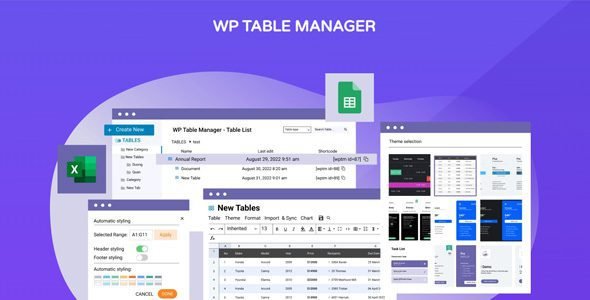
WP Table Manager is a powerful WordPress plugin designed to help you create and manage tables with ease. Ideal for users who need to display structured data, this plugin offers a spreadsheet-like interface, allowing easy table editing, drag-and-drop functionality, and advanced content management.
With WP Table Manager, you can import/export tables from Excel or Google Sheets, create charts, and customize your tables with CSS. It integrates seamlessly with WordPress, offering both backend and frontend table management for a streamlined user experience.
Perfect for businesses and content creators, this plugin makes data management simple and efficient.
⭐ Key Features
- Spreadsheet-style table editor for intuitive data management
- Responsive tables with mobile-friendly display modes
- Import and synchronize data from Excel, Google Sheets, Office 365, and CSV files
- Visual and HTML cell editing with support for tooltips and custom CSS
- Advanced calculations using functions like SUM, AVG, MIN, MAX, and more
- Sorting, filtering, pagination, and column visibility control
- Frontend table editing with user role-based access control
- Integration with Elementor, DIVI, WPBakery, Gutenberg, and Avada page builders
- Chart generation from table data with automatic updates
- Import and export data with Excel, Google Sheets, Office 365, and CSV files
- Undo and redo operations with AJAX-based saving
- Multi-lingual support with community translations
- Backup and restore table data
- Customizable themes and colors for tables
- Unlimited tables, rows, and columns with no restrictions
- Integration with Gravity Forms and Ninja Forms for dynamic table creation
- WooCommerce compatibility for product and pricing tables
- Shortcode support for embedding tables and charts in posts and pages
- Database-driven tables with automatic updates
- Advanced styling options including font, size, alignment, and color
- Zoom functionality for adjusting table view
- Drag-and-drop table reordering and editing
- Image embedding and media support within tables
- Customizable cell borders and spacing
- Real-time collaboration for team-based table editing
- Secure and optimized queries using WordPress best practices
📥 Download & Setup
- Log in to WordPress Dashboard → Plugins → Add New → Upload Plugin→ Choose the downloaded zip file → Install Now → Activate.
- You will need to share Temporary Login Access with us for installation, if required.
🔐 License Type: GPL
⚠ Important:
Resell and Share Not Allowed.
📌 Please Note:
🌍 Digital Overall showcases only the world’s top daily digital products — 100% authentic & verified.
🔍 Can’t find a product? Request that we add it, or Call, WhatsApp/Email us — we’ll do our best to provide it for you.











Reviews
There are no reviews yet.